

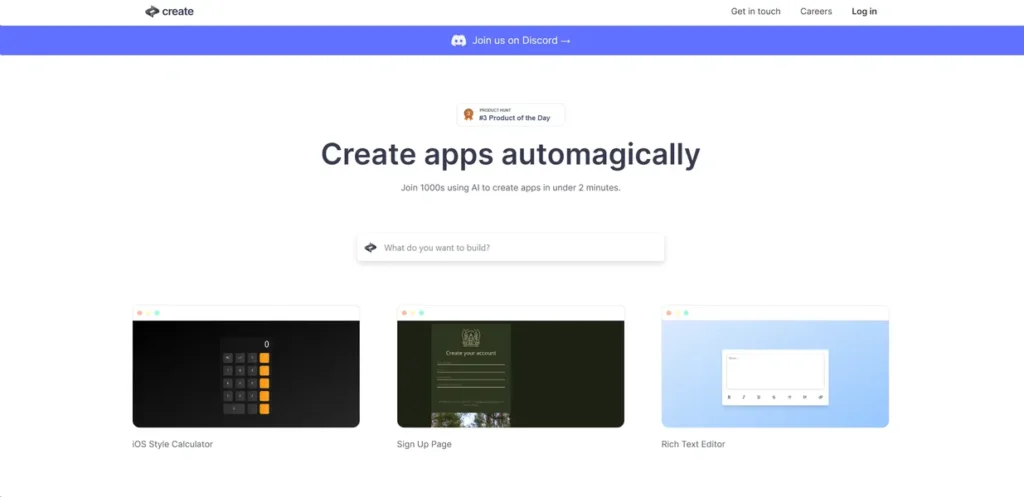
What is Create?
From a software development perspective, Create represents a significant step forward in high-level abstraction. It’s an AI-driven platform designed to translate declarative inputs—plain text descriptions and image-based mockups—into functional application code. This effectively removes the need for boilerplate code and manual syntax management for a wide range of applications. For development teams, Create serves as a powerful accelerator, enabling the rapid construction of minimum viable products (MVPs), internal tools, and interactive prototypes. By interpreting user intent rather than explicit commands, it fundamentally shifts the development paradigm from writing code line-by-line to describing desired outcomes, allowing for a more streamlined path from concept to deployment.
Key Features and How It Works
Create’s architecture is built around a core AI engine that synthesizes code based on user inputs. It operates through several key components that work in tandem to deliver a cohesive development experience.
- AI-Powered Code Generation: At its heart, Create uses a sophisticated model that interprets natural language and visual data to generate code. Think of it like a master architect who can turn a detailed verbal description of a building into a complete set of blueprints overnight. You provide the high-level requirements, and the AI handles the complex, low-level implementation details, from UI components to backend logic.
- Intuitive Design Interface: The platform provides a streamlined graphical user interface (GUI) that abstracts away the complexities of environment setup and configuration. It allows developers and designers to focus on application logic and user experience rather than getting bogged down in build tools and dependencies.
- Diverse Template Selection: Create offers a library of pre-configured project scaffolds. These templates serve as a solid architectural baseline, providing foundational code for common application types like to-do lists, dashboards, and organizational charts. This allows teams to bypass initial setup and dive directly into feature development.
- Interactive Tutorials and Onboarding: To flatten the learning curve, Create includes guided tutorials. These are essential for understanding the platform’s unique, AI-assisted workflow and for learning how to structure prompts and inputs to achieve predictable, high-quality results from the AI engine.
Pros and Cons
Like any development tool, Create offers a distinct set of trade-offs that are critical to evaluate from a technical standpoint.
Pros
- Accelerated Prototyping: The platform drastically reduces the time from initial concept to a testable prototype, enabling faster iteration cycles and market validation.
- Reduced Development Overhead: By automating code generation, Create significantly cuts down on the developer hours required for building standard application features, freeing up engineering resources for more complex, core business problems.
- High-Level Flexibility: It is versatile enough to handle projects ranging from simple, single-purpose utilities to more intricate business tools, making it a valuable asset in a developer’s toolkit.
- Active Community Support: Access to a Discord community provides a vital resource for debugging platform-specific issues, sharing effective prompting techniques, and collaborating on solutions.
Cons
- AI Prompt Engineering Curve: While it is a no-code tool, achieving precise results requires learning how to effectively communicate intent to the AI. This skill, often called prompt engineering, has its own learning curve.
- Abstraction Ceiling: Advanced developers may encounter an ‘abstraction ceiling,’ where the platform’s high-level nature prevents fine-grained control over the underlying code, performance optimizations, or specific library implementations.
- Non-Deterministic Outputs: The quality and structure of the generated code depend heavily on the AI’s interpretation. The same input may not always yield identical results, which can pose challenges for version control and debugging complex issues.
Who Should Consider Create?
Create is not a one-size-fits-all solution, but it provides immense value for specific roles and use cases within the tech ecosystem.
- Product Managers and Entrepreneurs: Ideal for building and testing MVPs to validate business ideas with a functional product, without needing to allocate a full engineering team from day one.
- Full-Stack Developers: An excellent tool for rapidly spinning up internal dashboards, admin panels, or proofs-of-concept, thereby conserving time and effort for mission-critical, core product engineering.
- UI/UX Designers: Enables designers to move beyond static mockups and build truly interactive prototypes, facilitating more effective user testing and stakeholder feedback sessions.
- Technical Educators and Students: Provides a practical environment for teaching core application architecture and logic without the steep learning curve of traditional programming languages and frameworks.
Pricing and Plans
Detailed pricing and subscription tiers for Create were not available at the time of this review. The platform does offer a free tier, allowing users to explore its basic functionalities and assess its fit for their projects. This is an effective way to test the AI’s capabilities and the overall workflow before committing to a paid plan. For the most accurate and up-to-date pricing, please visit the official Create website.
What makes Create great?
Create’s most powerful feature is its ability to serve as a multi-modal compiler, translating human-friendly inputs like plain text and images directly into executable application code. This isn’t just another no-code builder; it’s a fundamental shift in how software can be conceptualized and constructed. By abstracting the syntax and replacing it with semantic intent, it dramatically lowers the barrier to entry for application development. This unique capability to understand and synthesize from both textual descriptions and visual layouts sets it apart, offering a glimpse into a future where software creation is more about clear communication and less about syntactical precision.
Frequently Asked Questions
- How does Create handle version control and collaboration for team projects?
- Create includes built-in collaboration tools that allow for shared project access. While it may not offer the granular control of a system like Git, it provides features for teams to work concurrently on app development and manage project versions within the platform’s ecosystem.
- Can I export the generated code to host or modify it in a traditional IDE?
- The ability to export raw code varies among low-code/no-code platforms. Users interested in this functionality should verify with Create’s official documentation. The primary value is in its integrated environment, but code export would be a critical feature for long-term scalability and avoiding vendor lock-in.
- What are the limitations regarding scalability and performance for apps built with Create?
- Applications built on platforms like Create are generally well-suited for small to medium-scale use cases, such as internal tools and MVPs. For high-traffic, enterprise-grade applications, developers should carefully evaluate the underlying architecture and performance limitations to ensure it meets their scalability requirements.
- How does Create ensure the security of the generated code and the applications?
- Security is a key consideration. Create likely builds upon established frameworks and follows industry best practices for its code generation. However, users are responsible for implementing application-level security, such as user authentication and data validation, and should review Create’s security documentation for specifics on their infrastructure and compliance.