

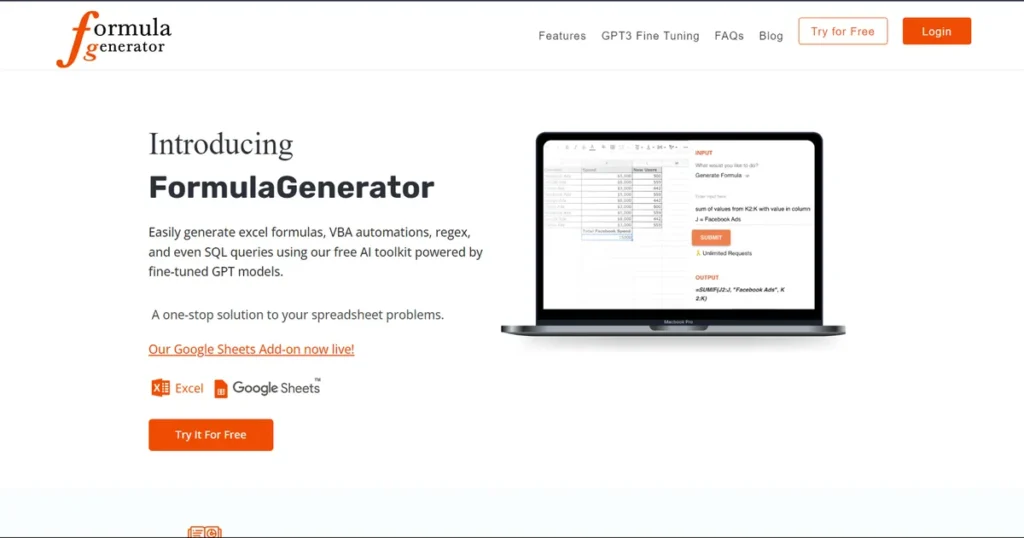
What is Formula Generator?
Formula Generator is an AI-powered tool designed to streamline data management and analysis for fast-moving professionals. For marketing managers, this means significantly less time spent wrestling with spreadsheet syntax and more time deriving insights from campaign data. The platform translates simple text instructions into complex Excel formulas, VBA automations, Google Apps Script, and SQL queries. Whether you’re segmenting a new lead list, analyzing PPC campaign results, or building a performance dashboard, Formula Generator acts as a dedicated data assistant, removing the technical barriers often associated with sophisticated data manipulation.
Key Features and How It Works
Formula Generator operates on a simple premise: you describe the task, and the AI generates the solution. This intuitive workflow is powered by a suite of purpose-built features for marketing and data-heavy roles.
- Natural Language Formula Generation: Instead of searching for the correct syntax, simply type your objective, such as, “Sum the values in column C for all rows where column A is ‘Q4 Lead'”. The tool instantly produces the correct formula for Excel or Google Sheets.
- Error Spotter and Debugger: Paste a broken formula into the tool, and its AI will identify the error and suggest a correction. This is invaluable for quickly fixing complex formulas in inherited marketing reports without having to deconstruct them manually.
- Formula Explanations: The “Explain Formula” feature breaks down intricate formulas into easy-to-understand descriptions. This helps marketing teams understand the logic behind their reports and enables them to make modifications confidently.
- Versatile Code Generation: Beyond standard formulas, the tool generates VBA and Google Apps Script to automate repetitive tasks, such as formatting new data exports or sending email summaries. It also crafts SQL queries, allowing marketers to pull specific customer segments directly from a database without relying on an engineering team.
- AnswerBot: An integrated Q&A feature powered by OpenAI’s ChatGPT provides direct, ad-free answers to spreadsheet-related questions, keeping you focused and productive within your workflow.
Pros and Cons
While a powerful asset, it’s important to weigh its capabilities against its limitations for a complete picture.
Pros:
- Drastic Time Savings: Immediately reduces the time spent on manual formula creation and debugging, accelerating report building and campaign analysis.
- Empowers Marketing Teams: Lowers the technical skill barrier, enabling team members to perform complex data analysis tasks that were previously reserved for data specialists.
- High Accuracy: The AI is fine-tuned for spreadsheet and database languages, resulting in highly reliable and accurate outputs for most standard business tasks.
- Centralized Workflow: Supports Excel, Google Sheets, and SQL, covering the primary tools used in most marketing departments for data management.
Cons:
- Internet Connection Required: As a web-based application and cloud extension, it cannot be used offline, which may be a limitation for some work environments.
- Prompt Specificity: The quality of the output is dependent on the clarity of the user’s input. New users may need a short adjustment period to learn how to phrase requests for optimal results.
Who Should Consider Formula Generator?
Formula Generator is a strategic tool for any professional whose role involves data-driven decision-making. Marketing managers, in particular, will find it indispensable for enhancing team productivity and analytical capabilities.
- Marketing Managers: To rapidly build performance dashboards, forecast budgets, and analyze the ROI of various campaigns without getting bogged down in formula syntax.
- Digital Marketing Specialists (PPC/SEO): For managing and analyzing massive datasets from Google Ads, analytics platforms, and keyword research tools.
- Marketing Operations: To clean, segment, and manage lead lists efficiently for CRM import and campaign execution.
- Data Analysts: To automate the creation of complex queries and formulas, freeing up time for higher-level strategic analysis.
Pricing and Plans
Formula Generator operates on a freemium model, making it accessible for individuals while offering robust features for professional teams.
- Free Tier: This plan offers access to the core formula generation and explanation features, making it ideal for individuals or professionals with occasional spreadsheet needs.
- Pro Tier: Starting at $7 per month, the Pro plan unlocks advanced features, higher usage limits, and priority support. This tier is designed for marketers and data professionals who regularly rely on spreadsheets and databases for their workflow.
For the most current and detailed pricing information, please refer to the official Formula Generator website.
What makes Formula Generator great?
The single most powerful feature of Formula Generator is its ability to translate natural language instructions directly into executable formulas and code. This removes the cognitive friction between knowing what you want to achieve and knowing how to command a spreadsheet to do it. For a marketing manager, this means the difference between spending an hour searching for the right nested IF statement and simply typing a sentence to get the same result in seconds. This directness, combined with specialized features like the Error Spotter and an integrated AnswerBot, creates a highly efficient, focused work environment that other generalized AI tools cannot replicate for data-specific tasks.
Frequently Asked Questions
- Can Formula Generator help me analyze marketing campaign data?
- Absolutely. It excels at creating formulas for tasks like calculating conversion rates, segmenting customer data based on campaign interactions, summarizing ad spend, and analyzing engagement metrics across different channels.
- Is my data secure when using this tool?
- Formula Generator processes your instructions and formula structures but is designed with data privacy in mind. For sensitive information, always review the platform’s official privacy policy. The Google Sheets extension operates within Google’s established security framework.
- Does it integrate with Google Sheets?
- Yes, it offers a dedicated Google Sheets extension that seamlessly integrates its AI capabilities directly into your spreadsheet environment, allowing you to generate and explain formulas without leaving your document.
- How is this different from just using a general AI chatbot?
- Formula Generator is a specialized tool fine-tuned specifically for spreadsheet and database languages. This results in greater accuracy, a more intuitive user interface for data tasks, and integrated features like debugging that are not available in general-purpose chatbots.