

What is Workflow?
For any small business managing creative projects, the process can often feel chaotic. Endless email chains, confusing feedback, and inconsistent design assets can drain resources and delay deadlines. Workflow enters the market as a potential solution, positioning itself as a project management platform specifically designed for creative professionals. It combines task management with a sophisticated, AI-driven review process, aiming to streamline everything from initial design to final approval. The core promise is simple: reduce the tedious back-and-forth and ensure a higher standard of quality before a client ever sees the work. For a business owner, this translates to saved hours, fewer revision cycles, and a more professional output.
Key Features and How It Works
Workflow’s features are geared towards eliminating common bottlenecks in the creative process. Instead of just tracking tasks, it actively participates in the quality control of the assets themselves.
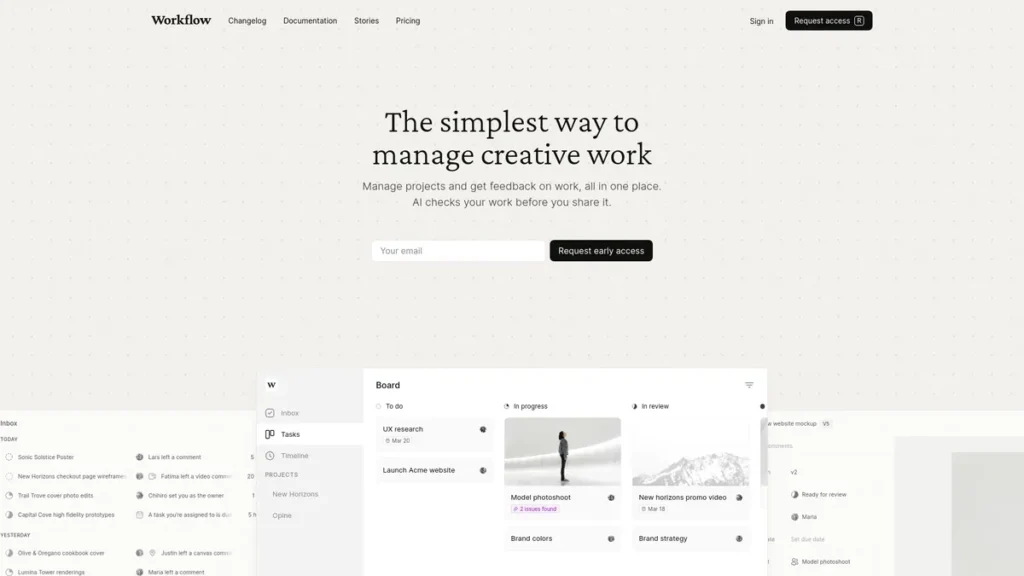
- AI-Powered Error Detection: This is the platform’s standout feature. Think of it as an automated pre-flight check for your designs. Just as a pilot runs through a checklist to ensure everything is perfect before takeoff, Workflow’s AI scans your assets for inconsistencies in alignment, padding, and text readability, flagging potential issues before they become client problems. This can significantly cut down on manual review time.
- Visual Workspace: Creative projects are ill-suited for spreadsheets and simple to-do lists. Workflow offers a visual-first dashboard where assets, timelines, and tasks are managed in a more intuitive, board-style layout. This provides at-a-glance clarity on project status, which is crucial for managers overseeing multiple initiatives.
- Direct Integrations (Figma & Adobe): The platform integrates seamlessly with essential design tools like Figma and the Adobe Creative Suite. This means designers can upload their work and sync comments without constantly exporting, uploading, and managing different file versions, keeping the entire process within a single ecosystem.
- Version Control: The system automatically tracks every version of a creative asset. This eliminates the confusion of files named ‘final_v2_final’ and provides a clear audit trail of changes, making it easy to compare revisions and revert to previous versions if needed.
- Comprehensive Feedback System: Feedback can be placed directly onto the asset in context. Whether it’s a website, a PDF, or a video, stakeholders can add comments precisely where they apply, ending the ambiguity of feedback delivered via email or chat.
Pros and Cons
Every tool comes with trade-offs, and a business owner needs to weigh them carefully.
Pros:
- Significant Time Savings: The AI error detection and centralized feedback system can dramatically reduce the hours spent on manual quality assurance and administrative back-and-forth.
- Improved Quality & Consistency: By automating checks for common design errors, Workflow helps maintain a high level of brand consistency and professionalism across all creative assets.
- Streamlined Collaboration: Having one central place for assets, feedback, and project status reduces miscommunication and ensures the entire team and a client are on the same page.
- Clearer Revision Tracking: Robust version control provides a transparent history of project changes, which is invaluable for both internal accountability and client discussions.
Cons:
- Initial Learning Curve: The platform is more specialized than a generic task manager. Teams will need to invest time in training to leverage its advanced features, which could mean a temporary dip in productivity.
- Limited Integrations: While it connects with key design and communication apps, it may lack direct integrations with other business-critical software your company uses, potentially requiring workarounds through a service like Zapier.
Who Should Consider Workflow?
Workflow is not a one-size-fits-all solution. It offers the most significant ROI for teams whose core business involves a high volume of visual asset creation and review cycles.
- Small Marketing Agencies: Ideal for managing multiple client campaigns simultaneously, ensuring brand guidelines are met and streamlining the approval process.
- E-commerce Businesses: Perfect for managing the constant flow of product imagery, social media ads, and promotional content where consistency is paramount.
- In-House Creative Teams: Provides a structured system to manage requests and feedback from other departments, replacing messy email threads and shared drives.
- Freelance Designers: Offers a professional way to manage client projects, gather feedback, and present revisions in an organized, efficient manner.
Pricing and Plans
During our review, detailed pricing information for Workflow was not publicly available. The platform appears to offer different tiers, including a free trial to allow users to experience its core features firsthand. For the most accurate and up-to-date pricing, please visit the official Workflow website.
What makes Workflow great?
Workflow’s single most powerful feature is its AI-powered error detection. While many tools can help you manage a project, very few actively help you improve the quality of the work itself. This automated quality assurance layer is the key differentiator. It shifts the platform from a passive organizational tool to an active participant in the creative process. For a small business, this isn’t just a convenience; it’s a direct impact on the bottom line. It reduces the non-billable time spent on tedious proofing, speeds up project delivery, and elevates the final product, which strengthens client relationships and justifies premium pricing.
Frequently Asked Questions
- How is Workflow different from standard project management tools like Trello or Asana?
- While Trello and Asana are excellent for general task management, Workflow is a specialized platform built for the nuances of creative projects. Its features, like in-context visual feedback, AI design analysis, and robust version control for creative files, are tailored specifically for designers, marketers, and video producers.
- Is my team’s data and client work secure on the platform?
- Workflow emphasizes security, understanding the sensitive nature of creative assets and client information. Based on our assessment, it employs strong security measures to protect user data, making it a reliable choice for professional environments.
- How steep is the learning curve for a team unfamiliar with such tools?
- There is a learning curve, especially for team members not accustomed to feature-rich platforms. While the interface is user-friendly, expect to dedicate a few days to onboarding and training to fully grasp its capabilities. The initial time investment is crucial for maximizing the tool’s long-term efficiency benefits.